



Can You Actually Restore It?
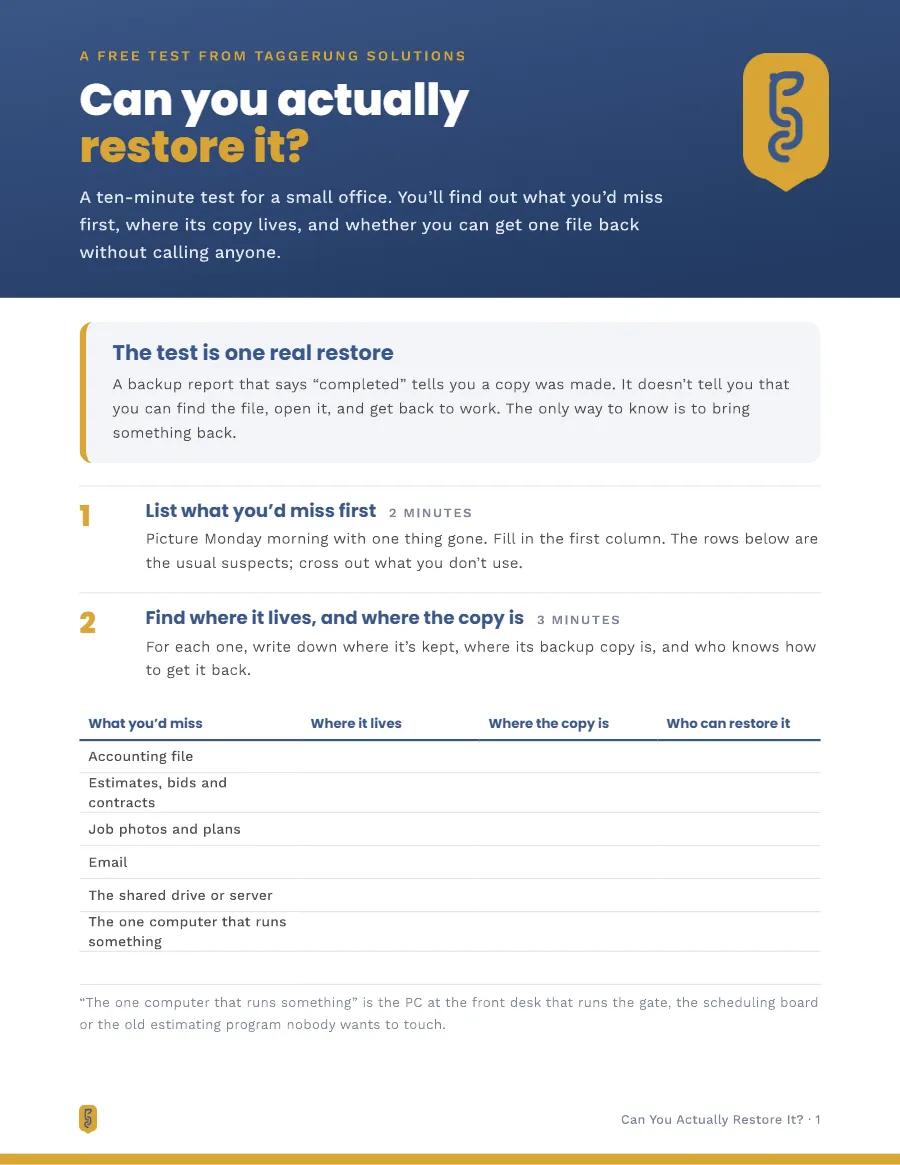
A backup report that says it ran tells you a copy was made. It doesn't tell you that you can find the file, open it and get back to work. This ten-minute test has your office bring one real file back, so you find out now instead of the day you need it.
Send Me the Test- List what you'd miss first, and where its copy is
- Bring one file back from OneDrive or Google Drive, a computer, email or the accounting file
- What your answers mean
- Five questions to ask whoever handles your IT
3 pages, PDF Andrew Allen, Taggerung Solutions, Albany, Oregon
Here's your restore test
Print it and do it with whoever knows where the files live. Pick a file someone changed last week, and restore it as a copy, never over the one people are using.
Download the test (PDF)A copy of the link is on its way to your inbox.
What's in It
Three Pages, Made to Print
-
What you'd miss first
A fill-in table: the accounting file, bids, job photos, email, the shared drive, and where each one's copy lives and who can get it back.
-
Bring one file back
Short how-tos for OneDrive, SharePoint or Google Drive, a file on a computer, an email, and the accounting file. Each one restores a copy, never over the live file.
-
What your answers mean
What it means if nobody could say where the copy is, if only one person knows how, or if one file took all afternoon.
-
Five questions for your IT person
Fair questions for an IT company, a nephew who set it up, or yourself, starting with when the last real restore was.
-
A restore log
A page to keep, so you can do the test again every few months and every time the computers, software or IT help change.
Want to Know What We Back Up?
Every client's email and files are backed up, on Microsoft 365 or Google Workspace, and computers are backed up on Keep it running and Run it for me. When someone needs a file back, you call or email us and we restore it.
See how Data Backup & Recovery works